The short answer: Both plugs switch an outlet over Wi-Fi and neither needs a separate hub. Choose the Amazon Smart Plug when the house already uses Alexa and you need one lamp. Choose the Kasa EP10 4-pack when you have several lamps and you are willing to use the Kasa app. The EP10 is 2.4 GHz only, rated 15 A and 1,800 W for a resistive load. Confirm the Amazon plug's load line on its listing before you exceed a lamp.
TP-Link's EP10 datasheet is the source for the Kasa figures, as linked from this site's Kasa page and read again for this guide. The Amazon Smart Plug is the single plug in our catalog: Alexa, no hub. This desk is not inventing a watt rating the listing does not show you. Black Friday is November 27, 2026. Cyber Monday is November 30, 2026. A plug does not become safer because of the date. See Black Friday, Cyber Monday, and curated picks.
We did not cycle these plugs in a lab.
Quick picks
| The household | Buy | Skip |
|---|---|---|
| One lamp, and people already say "Alexa" | Amazon Smart Plug | A four-pack that will live in a drawer |
| Several lamps or holiday lights on schedules, and someone will install an app | Kasa EP10 4-pack | A single plug you will wish was four |
| The outlet is controlled by a wall switch that stays off | Neither, until that habit changes | Any smart plug behind a switch that cuts power |
| You need to press a physical rocker, not cut power to a lamp | A SwitchBot Bot | A plug, which cannot flip a switch. See the SwitchBot guide |
| The device is a space heater, a medical device, or anything that must not run unattended | Neither, unless the appliance maker says a switched outlet is allowed | Remote power as a safety feature |
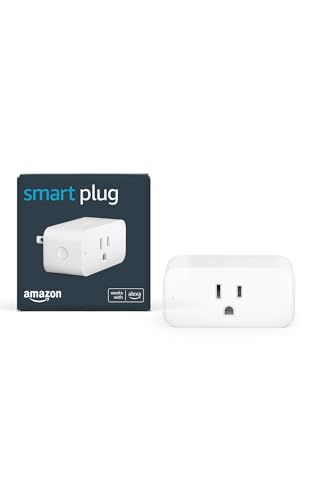 Check the current price on Amazon: Amazon Smart Plug
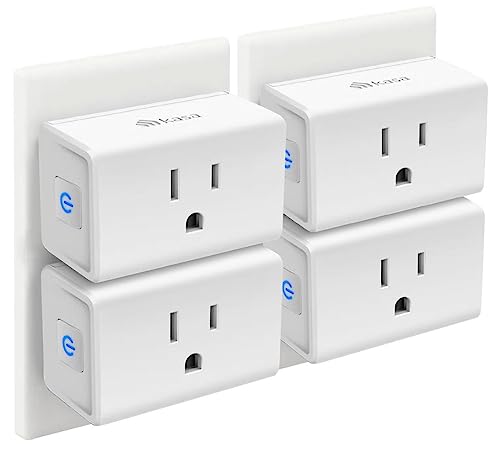 Check the current price on Amazon: Kasa Smart Plug Mini EP10, 4-pack
What the EP10 datasheet lists
TP-Link's EP10 sheet lists:
- Wi-Fi: 2.4 GHz only, 802.11 b/g/n. It does not join a 5 GHz network.
- Input and output: 100 to 120 V AC.
- Maximum load: 15 A. Maximum power: 1,800 W for general use, resistive load.
- App: Kasa Smart, Android 5.0 or later, iOS 10 or later.
- Voice: Amazon Alexa, Google Assistant, and Samsung SmartThings, in the datasheet's wording.
- Schedules, timers, scenes, and an away mode are named as features.
- A power button and a settings button on the plug.
- Operating range 32 F to 104 F, humidity 10 to 90 percent, non-condensing.
- Certifications listed: RoHS, FCC, IC, UL. Material listed as UL 94 V-0.
- A 4-pack contains four plugs and a quick start guide.
The 1,800 W line is a ceiling for a resistive load, not an invitation to run a heater from a plug you can turn on from the driveway. A lamp, a fan, or a string of indoor lights is the job these products are for. Read the appliance. If it says not to use an extension or a timer, believe it. The Kasa product page on this site makes the same point: a plug switches power. It does not operate the electronic controls of a machine that needs a button press after power returns.
Many lamps do not "remember" that they were on. If the lamp's own switch was off, restoring power at the plug does nothing visible. Test one lamp on the bench before you hide the plug behind a sofa.
Pros of the 4-pack: one app for several rooms, schedules, and voice if you want it. Cons: 2.4 GHz setup fails when the router has steered everything to 5 GHz, four plugs tempt people to automate outlets that should stay manual, and a second app is a real cost if the house lives in Alexa already.
What we will say about the Amazon Smart Plug
The listing this site links is a single Amazon Smart Plug. The catalog describes it as Alexa-controlled and hub-free. The beginner smart-home guide chooses it when the household does not want the Kasa app. Setup is in the Alexa app, next to an Echo if you have one. The Echo guide is how to pick that speaker. You do not need a new Echo to use the plug if the Alexa app is already in the house, but you do need the 2.4 GHz network the plug's own listing requires. Read that line on the page before you assume it matches the EP10. This guide will not paste a watt rating we did not read off a manufacturer sheet the way we did for Kasa.
Pros: one ecosystem, one plug, less to configure. Cons: it is one outlet, Google Assistant is not the reason to buy an Amazon plug, and a pack of four Amazon plugs is a different shopping trip from this ASIN. Confirm you are on the single plug this site means, not a bundle with bulbs.
The dad gift guide already uses this plug for a lamp, a fan, or a coffee maker he owns. A coffee maker is only a fit if cutting power is a safe way to turn that maker off, and if it returns to a safe state when power comes back. Many drip machines do not. When in doubt, use the plug on a lamp.
Side by side
| Kasa EP10 4-pack | Amazon Smart Plug | |
|---|---|---|
| Count on the listing we link | Four | One |
| Hub | Not required | Not required |
| Radio, as we will state it | 2.4 GHz only, from the TP-Link datasheet | Confirm 2.4 GHz on the listing |
| App | Kasa Smart | Alexa |
| Also listed for voice | Alexa, Google Assistant, SmartThings | Alexa is the path this site describes |
| Load | 15 A, 1,800 W resistive, on the datasheet | Read the listing. Do not copy the Kasa number onto it |
Buy Kasa if you want Google Assistant or SmartThings in the mix, because those names are on the EP10 sheet. Buy the Amazon plug if the only voice in the house is Alexa and you are automating one thing. Buying both brands for the same lamp is how a household ends up with two apps and one confused outlet.
Safety and setup, which matter more than the brand
Turn the router's 2.4 GHz band on before setup. A mesh system that combines band names can hide the band the plug needs. Stand next to the router for the first pair, then move the plug to the lamp and see if it stays online. A plug that only works in the same room as the router is a Wi-Fi problem, not a reason to buy a different brand. Fix coverage with the mesh or extender guide if the lamp is the room that has always been weak.
Do not chain a smart plug into another smart plug. Do not put one on an outlet that is already warm, damaged, or run through a thin extension cord. Do not use one to "save energy" on a refrigerator, a sump pump, or a freezer. Those devices need power when you are asleep. A schedule is the wrong feature there.
Name the plug after the lamp, not "plug 1." The person who did not install it has to be able to turn it off from the app and from the button on the plug. If that person will not learn either one, do not install it in a shared room.
Outdoor use is a no unless the product you bought is marked for outdoors. The EP10 sheet this desk read is an indoor mini plug. Holiday lights on a porch need a different, outdoor-rated product. Read the label.
Before you order
Count the lamps. One lamp points to the Amazon plug. Three or four point to the EP10 pack. Zero lamps means you do not need either. Run the 90-second deal check. Check the current price on Amazon for the ASIN you chose, not for a refreshed color or a 2-pack that replaced the page.
A plug is a reasonable small gift when the recipient already complains about a specific lamp. It is a poor gift when you are guessing that they want a smarter house. The beginner guide is the wider gift frame. November 27 and November 30 do not change the 2.4 GHz requirement.
Frequently asked questions
Does the Kasa EP10 need a hub?
No. It joins 2.4 GHz Wi-Fi. It still needs the Kasa app for setup and a network that offers that band.
Can the EP10 use 5 GHz Wi-Fi?
No. TP-Link's datasheet says 2.4 GHz only.
How much can the EP10 switch?
The datasheet lists 15 A and 1,800 W for a general, resistive load, at 100 to 120 V. A lamp is the intended use here. Do not treat 1,800 W as a heater recommendation.
Is the Amazon Smart Plug a better gift than the Kasa 4-pack?
It is the better gift when the person uses Alexa and needs one outlet. The 4-pack is the better gift when several outlets are part of a plan they asked for. An unasked four-pack is clutter.
Will a smart plug work if a wall switch is off?
No. The plug cannot power a lamp through an open wall switch. Leave that switch on, or skip the plug.
Does this page show prices?
No. Check the current price on Amazon.
Sources
- TP-Link EP10 datasheet, the sheet linked from this site's Kasa page.
- Kasa EP10 buying notes
- Smart-home gifts for beginners
- Black Friday and Cyber Monday